Showing posts with label 10. Show all posts

Clean Master 5 10 8 APK

Tuesday, December 27, 2016

The Clean Master Android app has a new feature for its many users to check out, thanks to its just released version 5.10.8 update that also has some under-the-hood performance improvements. You can grab the update on the Google Play Store, you can also download the latest Clean Master apk here.

Clean master apk

Developed by Cheetah Mobile, Clean Master is a unique app for your device that does everything your phone needs. It provides speed booster, battery saver, and free Anti-Virus for your Android phone and tablet. It just helps you arrange all apps to turn then off or clean your catch which you do always, but is nice to have them all in one place to do it quickly.

Cheetah Mobile has provided a quick change log of the Android update:
• Added deep cleaning for Facebook, Twitter and Messengers useless files
• Added Photo Optimization – keep beautiful photos and clean original ones to save space
• Added Battery Saver Reminder - save battery at night in 1 tap
• 1Tap Hibernate - easily hibernate apps to save power

You can download Clean Master APK version 10.8 from the direct link given below and then install it on your Android phone and tablet. Once the download finishes, tap the notification and then press the Install button. It will upgrade the version of Clean Master you currently have installed.

Clean Master download

File name: com.cleanmaster.mguard
Requires Android: 2.3.3+ (Ginger Bread)

What do you think of the new features?

Clean Master APK
Read More..

BBM 2 10 0 31 APK

Tuesday, October 11, 2016

BBM APK Download

BlackBerry Messenger, the popular BlackBerry-owned messaging service, has started rolling out a new PayPal integration feature for Android users in the form of an app update. The feature aims to let users quickly sending money to BBM contacts as an attachment. Thanks to its just released version 2.10.0.31 update that also has some under-the-hood performance improvements.

BlackBerry has provided a quick change log of the Android update:
• Bug fixes and performance improvements
• Official BBM Sticker Club subscription in the BBM Shop
• PayPal integration for sending money to BBM contacts as an attachment
• Customizable font size within BBM conversations with pinch-to-zoom
• Enhancements to BBM Voice connectivity
• View, like, and comment on group pictures and other events from within BBM feeds.

The update is now available to grab on the Google Play Store. As always, you can download the latest BBM apk file from the source link given below.

Download BBM APK
Read More..

File Explorer Plus Root v2 3 0 10

Sunday, September 25, 2016

Download Apk of File Explorer Plus/Root v2.3.0.10 from here
File Explorer Plus/Root v2.3.0.10 Android Market APK : 2.1 Android Market APK : FX: file explorer w/optional root, net (SSH,FTP,SMB,Google Drive) & media tools. FX File Explorer file manager / media manager capabilities. FX manage all content phone.


Here is updated download link
File Explorer Plus/Root v2.3.0.10

Read More..

Shadow Fight 2 1 9 10 APK Download

Friday, August 26, 2016

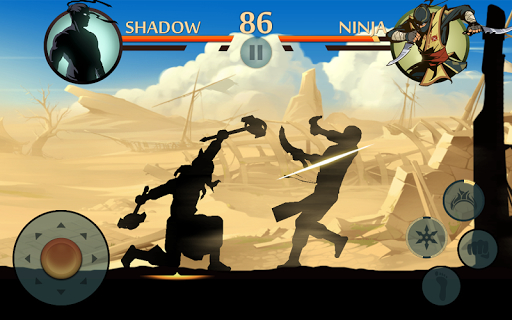
Shadow Fight 2 APK version 1.9.10 is now available for download. The update is live on the Google Play Store brings new Gear and various bug fixes. Shadow Fight 2 is one of the best fighting games has to offer with the variety of weapons and the different clothing and music. The game lets you control and equip the character with countless lethal weapons and rare armor sets, and features dozens of lifelike-animated Martial Arts techniques. This gameplay is really fun a great way to kill time which you have the mission to crush enemies, humiliate demon bosses, and be the one to close the Gate of Shadows.

Shadow Fight 2

While there are a variety of role-playing game available today, Shadow Fight 2 was one of the best games that got the genre going. The game is updated on a regular basis, with every update bringing new features and some improvements. This update features a different gear, so you can change your gear,  use purple orbs and dont lose the strength of your old one!

As a popular mobile RPG-fighting, this game is available for iOS, Android, Windows Phone, Windows Store, Amazon and also KAKAO. For Android, the game is available for free to play with in-app purchases. Do you have what it takes to kick, punch, jump, and slash your way to victory? Lets play and enjoy the classical fighting experience from your mobile device.

Download Shadow Fight 2 APK 1.9.10 update:

You can go to Play Store to grab the update or try the game out for the first time. The latest version of  Shadow Fight 2 requires Android 3.0 Honeycomb and up to work. Use the links below to download the APK file of this fun RPG and then install it on your Android phone or tablet.

Shadow Fight 2 APK Download
Read More..

Windows 10 Gets Its First Big Update

Thursday, August 18, 2016

Tracey Capen
By Tracey Capen
The much-anticipated fall update for Windows l0 has arrived. If youre looking for significant changes, youre going to be disappointed.
Version 1511 is an important update, but many of the enhancements are either buried in the Settings menus or under the hood.
The latest Win10, aka Fall Update, is far from a routine patch. According to Microsoft, its about a 3GB download, and on my test system it took around three hours for the full installation. And though it was officially released on Nov. 12, it could take days before it shows up on individual machines. On my test system, the update arrived sometime over the weekend; on my personal system, I received a notification but no actual update — yet.
Aside from Microsoft throttling the release of the update, there are other reasons you might not see Version 1511, according to a MS FAQ.
  • The delivery of Version 1511 will be delayed if you migrated to Win10 less than 31 days ago. The original Win10 lets you roll back to Win7 or 8.1 within a month of upgrading to the new OS. Apparently, once you install Version 1511, the roll-back option is disabled. When your Win10 setup reaches its one-month anniversary, Fall Update should show up in Windows Update and be automatically installed.
  • If you selected Defer upgrades in the Windows Update advanced options, there could be a delay receiving Version 1511.
    Note that the option to defer updates applies only to optional patches; security updates are always installed as soon as offered. According to a Win10 help page, new features "wont be downloaded or installed for several months." Windows 10 Home doesnt have the defer-updates option; Win10 Pro does.
  • Updates installed before Version 1511 will no longer show up in your update history (Start/Settings/Update & security/Windows Update/Advanced Options/View your update history).
  • If you uninstall Fall Update, it wont show up again in Windows Update — youll have to download it directly from Microsoft.
    How do you uninstall Version 1511? Although the update comes through Windows Update, you wont find it in your update history. Presumably, you use the Go back to an earlier build option (Settings/Update & security/Recovery). There, youll have to step through a series of questions before the process begins.
As generally seems to be the case with Windows 10, there can be many other reasons that an upgrade doesnt appear or install properly. You might, for example, have insufficient room on your hard drive — more of a potential problem on older systems with relatively small drives. Also, you might have to go through several rounds of "Check for updates" to ensure the system is fully up to date. (Win10 seems to be a bit erratic about when patches appear in Windows Update.)
You can check whether you have Version 1511 installed by checking About page (Settings/System/About). Look for the Version number, as shown in Figure 1. If you have problems receiving or installing Fall Update, you can, as a last resort, use the most current Media Creation Tool (site), which includes Version 1511. The tool should let you install Win10 while keeping your personal files. You might have to reinstall your apps.
Confirm Version 1511
Figure 1. The About window in Win10s Settings/System section should show Version 1511.
Whats new in Windows 10 Version 1511
As mentioned, the obvious changes included in Fall Update are fairly few. In fact, Microsofts Whats new page highlights just three — and one of those isnt for Windows but the Edge Browser. (As usual, Microsoft has done a poor job of documenting Windows changes.) Here are some changes I found when comparing an upgraded Win10 system with one that is still waiting for the upgrade.
Edge browser: The enhancements to Edge are relatively minor: Power Web users will like the webpage preview. Now, when you have multiple tabs active in the browser, rolling over a tab name pops up a handy thumbnail of its webpage (see Figure 2).............................................

SEE IT HERE..... CLICK CLICK CLICK
Read More..

Windows 10 Bumps Up Support call Traffic

Tuesday, April 26, 2016

Lincoln Spector
By Lincoln Spector
A major operating system upgrade always brings new problems — and a slew of frantic calls to tech-support services.
Queries about a new OS often go well beyond learning a user interface; drivers and applications have to be updated, and no amount of beta testing ensures that everything works.
All this is especially true of the Windows 10 upgrade. Users flocked to the new OS in record numbers. Many waited eagerly for months to try the Win8 replacement; others leaped at the apparent bargain of a free upgrade. And others, who didnt even want Win10, got it anyway, thanks to Microsofts aggressive upgrade policies.
Recently, the large support company RESCUECOM (website) reported that 56 percent of the calls it received in the third quarter were Windows 10 related — and Win10 didnt officially ship until the quarter was nearly a third over.
Curious about the most common Win10 issues, I interviewed RESCUECOM CEO David Milman, via email. Knowing more about possible upgrading traps makes it easier to avoid or fix them.
RESCUECOM is a subscription-based tech-support and repair company for Windows, Macs, tablets, and phones. Subscriptions start at U.S. $30 a month and include both tech calls and house calls (at no extra cost).
Milman wouldnt tell me how many subscribers the company has, but he stated that RESCUECOM has over 6,500 employees and contracted freelancers, which gives you an idea of its size.
Note: Aside from researching and writing this article, I have no connection with RESCUECOM. Ive never used, tested, or reviewed the service. So I cant say whether its better or worse than its competitors.
With the Win10 release, the phones start ringing
Milman noted that RESCUECOM always sees a surge in calls when an operating system gets a major upgrade. But Win10 was unusual; the volume of calls has been about double that of previous Windows releases. Most of the support questions "focused on problems with usability and a desire to revert [to Windows 7 or 8], instead of how to use the new OS," according to Milman.
The upgrade caught many users by surprise; they didnt understanding why their desktop suddenly looked different. According to Milman, "Microsoft was either brilliant or sneaky (the jury is still out) in how it delivered Windows 10, [which] appeared on just about every Windows 7 and Windows 8 (8.1) computer on the planet." (That doesnt include the many corporate systems.)
However, the majority of RESCUECOM callers were better informed. They had actively — perhaps even enthusiastically — updated their systems. But then they discovered that Windows 10 didnt always behave as advertised.
Milman noted that he ran into problems on his own machines and reverted one system back to Win8.1. "One of my two NVIDIA graphics cards was incompatible, and I didnt feel like spending the time to chase down the correct drivers."
(As described in the Aug. 27 Windows Secrets Top Story, "Thirty-day Win10 experiment lasts only a week," I had my own share of Win10 upgrade disasters — most of which have been resolved.)
Drivers drive Win10 upgraders to drink
Hardware failures — mostly due to incompatible drivers — are a common problem with new operating systems. "Some hardware will not [immediately] work with Windows 10," Milman told me. "Some older products may never get windows 10 drivers."
Milman suggests opening Windows Device Manager to find misbehaving drivers. (Right-click the Start icon and select Device Manager from the pop-up list.) Typically, a small yellow warning flag will be attached to the icon for a problematic device.
That is, of course, if you can use your computer at all. Bad video drivers can result in a black screen. For driver issues this severe, try booting into Safe Mode and downloading the correct drivers from the hardware manufacturers site. (Win10 doesnt make it easy to run Safe Mode. For more info, see the Sept. 17 Field Notes, "Lost and found: Windows 10s safe mode.") Open Device Managers again, right-click the failing hardware, and select Update Driver Software.
When a favorite app doesnt survive the upgrade
Most applications that work in Windows 7 and 8 should work in Win10 — but sometimes they dont. And XP-era applications are especially problematic. For in-place upgrades, Microsoft suggests running the system-compatibility checker thats in the Get Windows 10 option menu (see Figure 1)...

Continue reading; CLICK  HERE
Read More..

Rocket Music Player Premium v2 7 0 10

Saturday, March 5, 2016

Download Apk of Free Apk ?Rocket Music Player Premium v2.7.0.10 from here
Rocket Music Player Premium v2.7.0.10 Android Market App : Varies Android Market App : Rocket Music Player was designed listener. interface allows browse music faster without getting bogged down buttons.


Here is updated download link
Free Apk ?Rocket Music Player Premium v2.7.0.10

Read More..

Kludge on Channel 10

Tuesday, January 20, 2015

It seems as though my mate, Dave Wallace, is getting more popular every day. This time he is on Microsoft’s Channel Ten being touted as a pioneer in technology. I for one find David to be an inspiration and watching this video has confirmed it for me.
He has tasted Tablets (Acer C200 and Sahara Slate) and his feedback is always valuable as it comes from “the other side.” When someone truly lacks mobility – David is a quadriplegic – then the term mobility is not about planes, trains and automobiles. For Davie it is a way of life and a kludge!


Watch the video to see just how much technology and lateral thinking it takes to make Dave the productive star he is today. My hat goes off to him!
Read More..

Instructions on how to root Xperia Z FW 10 3 1 A 0 244

Tuesday, January 6, 2015

Instructions on how to root Xperia Z FW (10.3.1.A.0.244)
Yesterday Xperia Z / ZL has been unexpectedly upgraded Sony new FW 10.3.1.A.0.244 with many significant improvements in performance as well as a series of nasty bug fix in the previous FW. But rooting is what most people want to do on the FW upgrade to perform to install a mod favorite.
Read more »
Read More..

10 New Waterproof Smartphone Hp 2013 part 7

Friday, January 2, 2015


7.  Waterproof smartphone, Lenovo A660
     Price Rp 2.7 to 3 million


specification of Lenovo A660
Waterproof smartphone,
General 2G Network GSM 900/1800/1900
3G Network HSDPA 2100
Mini SIM-SIM
Announced 2012, September
Status Available. Released Exp. release 2012, October
Body Dimensions 125 x 65 x 10.5 mm (4.92 x 2:56 x 0:41 in)
Weight 138 g (4.87 oz)
      - IP67 certified - dust and water proof (up to 1m for 30 mins)
Display Type Capacitive touchscreen, 16M colors
Size 480 x 800 pixels, 4.0 inches (~ 233 ppi pixel density)
multitouch Yes
Protection Corning Gorilla Glass
Sound Alert types Vibration; MP3, WAV ringtones
loudspeaker Yes, Waterproof smartphone,
3.5mm jack Yes
Memory Card slot microSD, up to 32 GB, 8 GB included
Internal 4 GB, 512 MB ​​RAM
Data GPRS Yes
EDGE Yes
Speed
​​HSDPA, HSUPA
WLAN Wi-Fi 802.11 b / g / n, Wi-Fi hotspot
Bluetooth Yes
USB Yes, microUSB v2.0
Camera Primary 5 MP, 2592 х 1944 pixels, autofocus
Features Geo-tagging
Video Yes
Secondary Yes, VGA
Features OS Android OS, v4.0.4 (Ice Cream Sandwich)
CPU Dual-core 1 GHz
Sensors Accelerometer, proximity
Messaging SMS (threaded view), MMS, Email, Push Mail, IM, RSS
HTML5 browsers,
Waterproof smartphone,
GPS Yes, with A-GPS support
Java Yes, via Java MIDP emulator
Colors Black, Orange
      - SNS integration
- MP4/WMV/H.264/H.263 player
- MP3/WAV/WMA/eAAC + player
- Organizer
- Image / video editor
- Document viewer
- Google Search, Maps, Gmail,
YouTube, Calendar, Google Talk
- Voice memo / dial
- Predictive text input
Battery Li-Ion 1500 mAh battery
Stand-by No official data is
Talk time No official data is

Lenovo claims the device is a combination of performance, design, and features. Of all the series waterproof smartphone, the Lenovo designers have focused on maintaining a thin and lightweight smartphone remain without sacrificing performance.

Lenovo further stressed that most of the smartphones launched already in the portfolio-based quad-core processor.

To be continued
Read More..

Sony Xperia Z Xperia M started a new firmware update 10 3 1 A 2 67 15 1 C 1 17

Wednesday, December 31, 2014

As announced by Sony Mobile, Xperia Z started today received a new Firmware update (10.3.1.A.2.67). In this update Sony promises improvements to the screen, camera, computer performance.
Sony Xperia M has 15.1.C.1.17 Firmware update on Android 4.1.2, the focus changes to fix errors in the boot sequence, referring to the phenomenon of green when shooting, improved management ram.
Do you check for updates through Sony PC Companion.
Sony Xperia Z, Xperia M started a new firmware update (10.3.1.A.2.67), (15.1.C.1.17)

Sony Xperia Z, Xperia M started a new firmware update (10.3.1.A.2.67), (15.1.C.1.17)
Source: XperiaGuide, XperiaBlog
Read More..