Showing posts with label update. Show all posts

Windows 10 Gets Its First Big Update

Thursday, August 18, 2016

Tracey Capen
By Tracey Capen
The much-anticipated fall update for Windows l0 has arrived. If youre looking for significant changes, youre going to be disappointed.
Version 1511 is an important update, but many of the enhancements are either buried in the Settings menus or under the hood.
The latest Win10, aka Fall Update, is far from a routine patch. According to Microsoft, its about a 3GB download, and on my test system it took around three hours for the full installation. And though it was officially released on Nov. 12, it could take days before it shows up on individual machines. On my test system, the update arrived sometime over the weekend; on my personal system, I received a notification but no actual update — yet.
Aside from Microsoft throttling the release of the update, there are other reasons you might not see Version 1511, according to a MS FAQ.
  • The delivery of Version 1511 will be delayed if you migrated to Win10 less than 31 days ago. The original Win10 lets you roll back to Win7 or 8.1 within a month of upgrading to the new OS. Apparently, once you install Version 1511, the roll-back option is disabled. When your Win10 setup reaches its one-month anniversary, Fall Update should show up in Windows Update and be automatically installed.
  • If you selected Defer upgrades in the Windows Update advanced options, there could be a delay receiving Version 1511.
    Note that the option to defer updates applies only to optional patches; security updates are always installed as soon as offered. According to a Win10 help page, new features "wont be downloaded or installed for several months." Windows 10 Home doesnt have the defer-updates option; Win10 Pro does.
  • Updates installed before Version 1511 will no longer show up in your update history (Start/Settings/Update & security/Windows Update/Advanced Options/View your update history).
  • If you uninstall Fall Update, it wont show up again in Windows Update — youll have to download it directly from Microsoft.
    How do you uninstall Version 1511? Although the update comes through Windows Update, you wont find it in your update history. Presumably, you use the Go back to an earlier build option (Settings/Update & security/Recovery). There, youll have to step through a series of questions before the process begins.
As generally seems to be the case with Windows 10, there can be many other reasons that an upgrade doesnt appear or install properly. You might, for example, have insufficient room on your hard drive — more of a potential problem on older systems with relatively small drives. Also, you might have to go through several rounds of "Check for updates" to ensure the system is fully up to date. (Win10 seems to be a bit erratic about when patches appear in Windows Update.)
You can check whether you have Version 1511 installed by checking About page (Settings/System/About). Look for the Version number, as shown in Figure 1. If you have problems receiving or installing Fall Update, you can, as a last resort, use the most current Media Creation Tool (site), which includes Version 1511. The tool should let you install Win10 while keeping your personal files. You might have to reinstall your apps.
Confirm Version 1511
Figure 1. The About window in Win10s Settings/System section should show Version 1511.
Whats new in Windows 10 Version 1511
As mentioned, the obvious changes included in Fall Update are fairly few. In fact, Microsofts Whats new page highlights just three — and one of those isnt for Windows but the Edge Browser. (As usual, Microsoft has done a poor job of documenting Windows changes.) Here are some changes I found when comparing an upgraded Win10 system with one that is still waiting for the upgrade.
Edge browser: The enhancements to Edge are relatively minor: Power Web users will like the webpage preview. Now, when you have multiple tabs active in the browser, rolling over a tab name pops up a handy thumbnail of its webpage (see Figure 2).............................................

SEE IT HERE..... CLICK CLICK CLICK
Read More..

Clash of Clans 8 67 8 APK Christmas Update

Monday, April 11, 2016

The holidays are coming and Supercell has released their Clash of Clans Christmas update to the public on the Play Store. The new COC update adds Winter decorations and new features can we expect this holiday.

Clash of Clans Christmas update apk download

Clash of Clans is the incredibly successful strategy game developed by Supercell now available on the Play Store in all regions. Its a great mobile game that you can play on your smartphones and tablets, both iOS and Android. The game lets you battle with a large variety of troops, build a unique defense and match up with other players.

Heres whats new and improved in the new Clash of Clans Christmas update:
• New Winter theme!
• Bug-fixes for the new Shield system and game crashes
• New info screen when tapping the Shield icon shows exact Personal Break timer status
• Fixed and cleaned up various UI issues

The Clash of Clans Christmas update is live right now on the Google Play Store, so if you already play it, you should be seeing it available to download. And for those who cant download the update on the Play Store you can grab the latest Clash of Clans APK file from the source link given below.

Clash of Clans Christmas Update APK file download
Read More..

2012 Google Android and Smartphone News Update HTC One XL selling in Australia now!

Friday, January 30, 2015

SIM-free and unlocked HTC One XL is now available in Australia. Currently, Oz residents can only purchase the black version for AU$850 (€660). It will work on every GSM carrier in Australia and on Telstra’s LTE network.

In case you are thinking of importing one over, youd be glad to find out that the HTC One XL supports the needed European GSM and 3G bands as well. Theres even support for some of the upcoming LTE networks in Europe working on the 2600MHz band.

HTC One XL is similar to the One X we already reviewed, save for the chipset. The One XL uses a Snapdragon S4 MSM8960 SoC with a 1.5GHz dual-core Krait CPU and Adreno 225 GPU. The NVIDIA’s quad-core Tegra 3 does not offer native LTE support, which caused the chipset swap.

This makes Australia the second country to get a Krait-powered One X after the US, whereAT&T offers it. We already covered its chipset performance and found that its often doing better than the Tegra 3 in the One X.

In fact we are currently putting the final touches to our HTC One X for AT&T review. It should go live later tonight so stick around if you want to learn more about it.

This post sponsored by:
Dr Mobiles Limited
1 Huron Street, Takapuna, North Shore 0622
Tel: (09) 551-5344 and Mob: (021) 264-0000
Web - Map - Google+ - Email - Posterous -  Tumblr - Twitter - Blogger - Flickr -  Author    

Read More..

Smartphones news update 2012 Google Android 4 2 update rolling out for HTC One Dual Sim 0212640000

Wednesday, January 28, 2015

HTC created a special Dual Sim version of its HTC One flagship, which is limited to several markets like India, China and Russia. Strangely enough this is also the first One variant to receive Android 4.2.2 (not counting the Nexus Edition), the worldwide version of the flagship is still on 4.1.2.
The update brings a number of improvements to both the Android base and HTCs customizations. Theres a widget-enabled lockscreen, quick toggles in the notification area plus smaller enhancements like rearranging homescreen panes, battery percentage in the status bar, options for the Home button to remove the on-screen Menu button.
The Camera and Zoe apps were improved too – now you get AE/AF lock, an updated Zoe file format that handles videos better and 6 new themes for Video highlights.


The update weighs in at 175MB and is only for the dual-SIM version of the phone. The update for the regular HTC One should come out soon. This might be HTC playing it safe, first releasing the update for the rarer One Dual Sim to make sure there are no issues before launching for the the more popular HTC One.


Dr Mobiles Limited (Head Office) (Map):1, Huron Street, TakapunaNorth Shore 0662Tel: (09) 551-5344Mob: (021) 264-0000info(a)drmobiles.co.nz
Dr Mobiles Limited (West Auckland) (Map):3069 Great North RoadNew Lynn, Auckland 0600.  Tel: (09) 555-5344Mob: (021) 374-007 sales(a)drmobiles.co.nz
Dr Mobiles Limited (Wellington) (Map):  Shop 6, 148 Willis Street, Te Aro, Wellington 0600.  Tel: (04) 550-6399 and Mob: (021) 265-2000
wgtn(a)drmobiles.co.nz.  LIKE us on FaceBook.com
Read More..

Calibration update for Windows 7 Viliv S5 HID Driver

Saturday, January 17, 2015

Last week I posted about the release of Vilivs Human Interface Device (HID) Driver for their S5 Mobile Internet Device (MID). Many of you reported mixed results (most came via Engadgets story) but sadly a common theme amongst the feedback was a change in sensitivity of touch, while others reported total loss of calibration and even dead spots. Ultimately I want to thank you for participating in the process and commend all of you for being part of the solution! Part the reason I write this blog is to act as a bridge between manufacturers and end-users and with your contributions mere conversations become so much more!

I spent the week working with Viliv Senior Technicians to resolve the HID Driver issues and reporting back each and everyone of your comments. Something that has become clear is that HID users need to realise that the presence of a HID Driver will in fact alter the touch experience; there are many technical reasons for this but in plain English the difference is based on the new layer of "thinking" being conducted by the driver to help Windows understanding exactly why you are touching and what your intended action is. You must expect a change in sensitivity but by no means should you expect dead spots!

With that in mind...here is the solution from the factory:

Please use the instructions below to enhance the sensitivity and accuracy for S5 
  1. Check the attached “S5 reset.jpg” file
  2. Reset the Calibration from Tablet PC setting
  3. Execute S5cal.bat and calibrate 25point
As always I will make myself available in the coming days to answer your queries and pass on your comments once again.

Cheers! Enjoy!
Read More..

What the lates update iphone ios 5 can do

Saturday, January 10, 2015

what latest generation iphone can do?


lates update iphone have Notification Center. notifcation center on iphone 4s is the one place where we can see all notification on iphone. notification center on iPhone works with your apps to let you know about missed messages, calendar invitations, friend requests, and more. New notifications appear discreetly at the top of your screen. And you can see a summary of recent notifications when you swipe down from the top of any screen. just like notification on your facebook.


lates update iphone also have Twitter Integration. Twitter is integrated into iphone iOS 5, so you can sign in once under Settings and begin tweeting directly from Safari, Photos, Camera, YouTube, and Maps. You can even start typing a friend's Twitter handle and iOS will autocomplete the rest from your contacts


other iphone ios5 is iMessages. with iMessage Now you can text it up with fellow iPhone, iPad, and iPod touch users running iOS 5. Messages with iMessage are unlimited. And secure, too. Talk to all your friends or family at once with group messaging. See who's reading with delivery and read receipts. And if words aren't enough, send photos, videos, locations, and contacts.


the most awesome update of iphone ios5 is photo capability. you can touch up photos right on your iPhone , without the help of photo editing software on a computer. Crop, rotate, enhance, and remove red-eye. Then organize your shots into albums, so you know exactly where your favorites are when the next photo-sharing opportunity presents itself.
Read More..

Sony Xperia Z start Android 4 2 2 update

Wednesday, January 7, 2015

The joy was in the Z Xperia users when after only a few days ZL brother Xperia Android 4.2.2 update is expected of every blockbuster has officially landed a new version of the operating system of Google. The FW is 10.3.A.0.423 code, a number of users in China, Taiwan has received reflect an upgrade via PC Companion (The C6603 and C6602).

Make sure you connect to update or tracking topics in the forum below to update via FTF file

Download 2 files FTF 
C6603_10.3.A.0.423_Generic ES.part1.rar
Read more »
Read More..

Sony Xperia L officially started a new firmware update 15 0 A 2 17

Sunday, January 4, 2015

Sony Xperia L officially started a new firmware update (15.0.A.2.17)
Xperia L has just received new FW codenamed 15.0.A.2.17, in this update Android 4.1.2. Sony remains adds Small Apps and enhanced machine performance . Users can now update via PC Companion.
Read more »
Read More..

HTC One Android 4 3 update to help better low light photography

Wednesday, December 31, 2014

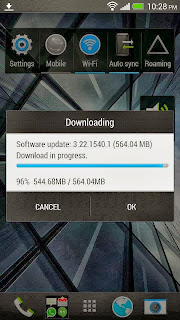
Recently, HTC has officially released Android 4.3 update for HTC One smartphone his senior. With this software upgrade, HTC One for low-light photo quality better than the previous one while the machine is operating more stable and less heat. Besides, users can also control the volume when using the HTC One tracking% battery has also been added.
HTC One Android 4.3 update to help better low-light photography
HTC One Android 4.3 update
HTC One Android 4.3 update better low-light photography
Some other improvements in the Android 4.3 update for HTC One option includes several videos as well as the Gallery app that changes are more intuitive.
HTC One user can perform device firmware upgrade via Wi-Fi with OTA protocol.
Android 4.3 update for HTC One software 564.04 MB.
Read More..

Sony Xperia Z Xperia M started a new firmware update 10 3 1 A 2 67 15 1 C 1 17

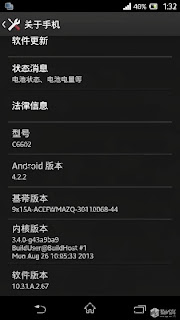
As announced by Sony Mobile, Xperia Z started today received a new Firmware update (10.3.1.A.2.67). In this update Sony promises improvements to the screen, camera, computer performance.
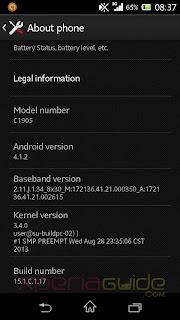
Sony Xperia M has 15.1.C.1.17 Firmware update on Android 4.1.2, the focus changes to fix errors in the boot sequence, referring to the phenomenon of green when shooting, improved management ram.
Do you check for updates through Sony PC Companion.
Sony Xperia Z, Xperia M started a new firmware update (10.3.1.A.2.67), (15.1.C.1.17)

Sony Xperia Z, Xperia M started a new firmware update (10.3.1.A.2.67), (15.1.C.1.17)
Source: XperiaGuide, XperiaBlog
Read More..