Showing posts with label new. Show all posts

How To Create A New Blog On Blogger com

Thursday, June 16, 2016

Blogger | How to create a new blog

Hello and welcome to Poproductions™ Online help, today we decided to help you get started on creating your own free blog on blogger.com.

But before we take you through the steps you might want to learn more about blogger?
Here is a little news about blogger:

Blogger is an online service owned by Google that publishes single or multi-user blogs created entirely by the user. The service has quickly become the preferred choice of many novice bloggers and is one of the easiest methods of creating and publishing a blog for free. If you are unfamiliar with the service, this article will teach you how to set up an account and create a blog on Blogger.com

STEP#1
Using any PC web browser, type www.blogger.com into the address field (bar) and enter to load the Blogger home page.

STEP#2
Get started by signing in to your Google account (if you have one) otherwise create a new Google (Email) Account and continue the steps.

STEP#3
After signing in, the blogger home (dashboard) appears. Click on ‘New blog’ that is located on the left side bar.

STEP#4
A pop-up interface will appear with a heading ‘Blog List > Create a new blog’ | Enter your intended blog tittle in the ‘Tittle’ field and in the ‘Address’ space just below, enter the web address of your choice (Please note that blogger will verify your address to see if it is not in use (availability check) before it’s approved) | Once your address is available you will be prompted, if not then keep on changing it until you get an available web address (quite disturbing but hey! It’s worth it)

STEP#5
Select a new Templatefrom the options just below (you can skip this step and a default ‘Simple’ template will be used but you can always do the changes easily | Contact us for a support)

STEP#6
Once your address is accepted, click on ‘Create blog!’ tab at the base of the working interface.

STEP#7
Start creating blogs by creating new posts from the ‘Posts’ section on the left sidebar.


Was this Article helpful? Then Rate us (by selecting one of the Reactions below).
For further enquiries, call (+233)(0)202284040
Email: poproductions@live.com

Download Our Android App to learn more: app.appsgeyser.com/Poproductions

We hope this article will prove helpful, Please use the contact us button if you want us to CREATE and MAINTAIN a PERSONAL BLOG or a COMMERCIAL BLOG for your online and local business, school, enterprise etc.
Interested? CLICKHERE.


Read More..

Apple iPhone 5 Unlock iPod iPad Google Android Tablet Repair new advertisement design April 13 2013

Saturday, January 31, 2015


Some of our new advertisement design for year 2013
This post is sponsored by:

Dr Mobiles Limited (Map)
1, Huron Street, Takapuna, Auckland 0622
Tel: (09) 551-5344, Mob: (021) 264-0000
info(a)drmobiles.co.nz
Facebook - Blogger - Twitter - Tumblr - Google+
 
New Lynn Branch (Map):
3069, Great North Road, New Lynn, 0622
Tel: (09) 5555-344, Mob: (021) 374-007sales(a)drmobiles.co.nz
Read More..

Apple iPhone 6 Crack Screen Repair 2014 Auckland New Zealand Dr Mobiles Limited

Thursday, January 29, 2015

Tuesday, 23rd December 2014:  Quite a few Apple iPhone 6, iPhone 6+ and Galaxy S5 came for repair today, as everyone was getting ready to go away for the long Christmas and New Year 2015 Break.

The young lady is our facebook friend and a corporate client.

Dr Mobiles Ltd, 1, Huron St, Takapuna, Auckland 0622. T: 09-5515344, info@drmobiles.co.nz

--
Sent from Gmail Mobile
Read More..

Foxconn says iPhone 5 is the most difficult device it has ever built Dr Mobiles Limited Auckland New Zealand

Wednesday, January 28, 2015


Still can’t get an iPhone 5? It might be Apple’s (AAPL) fault and not just a display production shortage. According to The Wall Street Journal, a Foxconn official who wished to remain anonymous said the “iPhone 5 is the most difficult device that Foxconn has ever assembled” and even now, workers are still learning how to manufacture the smartphones to meet Apple’s high standards.
 
The anonymous Foxconn official went on to say that the iPhone 5 “uses a new coating material that makes it more susceptible to scratching” and that it is much more difficult to meet quality checks. Since the iPhone 5 launched last month, Apple has caught flak for shipping smartphones with scuffs and scratches on the devices.
“It’s always hard to satisfy both aesthetic needs and practical needs,” said the Foxconn official.
 
Foxconn made headlines again on Tuesday after it reported that it had discovered underage interns working at its Yantai facility in the Shandong Province in China.

This post is sponsored by:

Dr Mobiles Limited (Map)
1, Huron Street, Takapuna, Auckland 0622
Tel: (09) 551-5344, Mob: (021) 264-0000
info(a)drmobiles.co.nz
Facebook - Blogger - Twitter - Tumblr - Google+

New Lynn Branch (Map):
3069, Great North Road, New Lynn, 0622
Tel: (09) 5555-344, Mob: (021) 374-007
sales(a)drmobiles.co.nz 
Read More..

Forget iPhone 5 The iPhone 6 Is Coming New Apple Patent Features Flexible Displays Tactile Feedback

Tuesday, January 27, 2015

It’s only been a week since Apple released the iPhone 5 to its adoring public, but gearheads are already looking forward to what new technologies and features the Cupertino, Calif.-based computer company might unveil in next year’s smartphone model, presumably called “iPhone 6.”

A newly released patent, filed in March but published on Thursday, describes a handful of new technologies currently being cooked up in Apple’s research & development labs for new iDevices, including tactile keyboards, laser microphones and speakers, and flexible displays.

All of these new features would reportedly work in tandem to give users a dynamic iPhone experience that conforms to the user’s needs: Flexible displays allow for easier holding and typing, while the highly-advanced tactile screen would create buttons when needed so the user can feel the letters as they type, or touch the topography on an Apple map.

Wireless technology blog Unwired View had a chance to break down some of the elements in Apple’s newly published patent application, and described how the tactile display would work:

“By placing an array of piezoelectric actuators below the display and activating them on demand for tactile feedback… this way you have a perfectly smooth surface when you browse the net or read your email," wrote Unwired Views Stasys Bielinis. "Call up a keyboard, [and] actuators pop up and now you can feel the letters as you type."

Tactile display technology, which is useful for using your device without looking at it, has been something Apple has long been interested in: On May 7, Apple published a patent for advanced haptics using a flexible OLED screen, which would allow users to physically interact with their content by touching it – an experience accomplished with sensors and actuators working simultaneously.

Apples multi-tiered system is extremely sophisticated: Using several layers of elastic screens stacked on top of each other, Apples screen can produce 3D buttons or objects to interact with, as well as give texture to images, like topographical maps, but only when theyre needed. This technology is currently being explored by another company, Tactus Technology, which created a video to explain how it all works.

Similar to Tactus work, Apples haptic system can respond to and create different types of actions, including vibration, net displacement, bending, deforming, or any combination of those elements. The technology can also work with a secondary display screen or audio system, which would be useful if Apple ever builds its iTV, but the system can also be applied to flexible organic light emitting diode, or OLED, screens. This advanced haptics system would also work with almost every portable Apple device, including iPhones, iPod Touch devices, iPads, MacBooks, and even TVs, video projectors and e-Ink displays.

But one of the great features about this flexible display technology is its ability to contain other internal components between the layers of the screen, such as a laser microphone or pressure sensor that, according to the patent filing, “receives sound or pressure information through the flexible display,” which can be temporarily or permanently deformed to provide tactile feedback to the device’s owner.

Unwired View also points out that since the display would be flexible, it could dynamically react to different sound vibrations as you speak, so Apple could potentially remove the traditional microphone holes and implant the sound technology within the screen to capture those sound vibrations.

In addition to sensing sound vibrations, the flexible screen would also be able to house components to generate sound waves as well. With a simple transducer behind the screen to transform electric current into vibrations, as long as the structure gets some barrier support, part of the screen can become a speaker membrane for surround sound. In other words, Apple could potentially implant different display based speakers for woofers, subwoofers, tweeters, supertweeters and mid-range speakers all right into that flexible screen.

254266296

While flexible screens, advanced haptics and microphone and speaker systems built directly into the display, whatever iDevice these technologies are intended for – hopefully next year’s iPhone 6 – looks to be a real powerhouse of new and exciting software technology.

However, these are just a few of the features we’re expecting in the iPhone 6, the seventh-generation smartphone expected to launch in Q3 or Q4 next year. There were a number of software features we were expecting for this year’s iPhone 5, but didn’t make into the final design; however, based off the multitude of rumors and patent filings about these technologies, it’s completely possible that these will be future features in an upcoming Apple device. Here’s what we’re looking forward to:

Crack-Proof Glass: Everyone whos ever had a rough Saturday night would certainly love this patent. Granted on Nov. 15, Apples patent for crack-resistant glass uses the same alumino silicate glass solution used in the iPhone 4 and 4S, but chemically treats it with potassium and sodium ions to achieve greater compression thresholds on the surface and edges of the glass, making it less susceptible to cracks.

Apples patent also includes a handy feature that would appeal to everyone whos ever dropped their iPhone on a Saturday night: The patent calls for a shock mount to be placed between the glass and the body of the device, which will instantly inflate if the device senses its falling. If the iPhones internal accelerometer senses its falling, an actuator within the device sucks in the cover glass as it accelerates to the ground, protecting it from damage.

NFC: The big kahuna of features, the near-field communication (NFC) chip which was long-rumored to be in the iPhone 5 until the final weeks leading up to the event, in which teardowns of new iPhone prototypes found no such chip. However, we were really hoping itd be there for so many reasons.

NFC is nothing new -- in fact, many current smartphones have the chip built-in so owners can use mobile payments solutions such as Square and Google Pay -- but Apple had a chance to implant and popularize the technology in a landmark device. A slew of recently granted patents seemed to suggest that Apple would introduce the NFC chip in the near future, but it just was not meant to be in the iPhone 5.

iWallet: Apple won a major patent on March 6 for a piece of technology called the "iWallet," which is a digital system that gives users complete control over their subsidiary financial accounts on their iPhones, and also leverages Near-Field Communication technology to complete credit card transactions directly on the phone as well. The iWallet has many different features, including giving users the ability to see their entire credit card profiles, view statements and messages from their banks, and even set parental controls for their children, should they also want to use their iPhones as digital wallets. Outside of the iPhone, users can keep track of their payments and statements within the iTunes billing system, which keeps credit card information and records safe and secure. Theres a possibility that iWallet could also work with other Apple utilities, which could allow users to buy things like movie tickets directly within the apps, but only time will tell with that one.

iTunes Gifts: Another Apple patent unveiled in April described a system for standardized buying, sending, and receiving of media files from a media provider (iTunes) between multiple devices (iPhones, iPads, and iPod Touchs). The process was simply called, "Gifting," and it would certainly work with an NFC-capable iPhone.

Downloading and storing digital media with online service providers has become commonplace -- more so than purchasing DVDs and CDs at physical stores -- but its not very easy to transfer digital files from one individual to another, usually because of copyright laws. Apple believes "Gifting" is the solution.

One method for gifting requires the sender to authorize a gift charge to their iTunes account, which is then transmitted from the senders device to the receivers device -- via tapping, or as long as theyre nearby -- thanks to the NFC chip. If the recipient of the gift isnt nearby -- or you want it to be a surprise -- the gift-giver may submit an official request with iTunes, which then processes the request and charges the initiators account for the given file. The patent also allows for multiple gifts to be sent in a single transaction, as well as certain customization options for the gifts -- including voice greetings and custom gift images, likely to conceal the gifts identity before the recipient opens it.

Audio Sharing Network: The last few months have seen Apple pay increasing attention to audio. It spun off its Podcast application as a completely separate application from the "iPod" app, it released its new EarPods with a superior speaker system, and now, according to a newly-filed patent for the iPhone, Apple plans to make the iPhone into a "conference telephone," designed to cut out the background noise while recording audio, which can then be packaged and distributed. This feature would certainly appeal to students that want to record their lectures, as well as enterprise professionals that want to hold and record teleconferences with multiple individuals and be able to hear everyone clearly.

The Shopping Companion: In 2010, Apple was granted a patent for an NFC-enabled application called "Products +," which packages and tags merchandise or products sold by vendors to learn more information about the product itself, as well as win "hidden benefits" like free merchandise or free music, or any kind of reward for that matter.

"The iPhones camera may be used to obtain a digital image of a matrix barcode tag," Patently Apple said. "The iPhone may thereafter employ optical character recognition (OCR) software, barcode-reading software, or matrix-code-reading software to extract information from an image as discussed later in the report."

For example, if a vendor like Starbucks or Tim Hortons used a barcode on the outside of their paper cups, iPhone users could scan the tags with their NFC-enabled iPhones and read nutrition information, advertisements related for related products, or ways to win free music or discounted food or drinks. The NFC chip could even be used to identify the song playing in the restaurant so you can purchase it. Read more about the incredible ways NFC could benefit the shopping experience here.

3D Photography. Its possible the iPhone 5 could allow users to finally snap 3D images with their phones. While existing 3D cameras and video recorders gather three-dimensional information from objects, theyre generally incapable of getting detailed enough information in relation to the shapes, surfaces and depth of the objects. Apples patented solution involves a series of systems, tools and methods to capture a 3D image by using multiple sensors and cameras. One sensor would capture a polarizing image, while two other sensors would capture two different non-polarizing images, and Apples system would combine the images into a composite.

The Photographers Timer. Traditionally, self-timing cameras are used to take pictures of a big group, or a self-portrait. But in Apples self-timer, a patent granted March 8, the iDevices camera can identify the photographer and ask if they want to be in the picture. At that point, the iPhone will simply wait until it detects the photographers face in the viewfinder before it automatically snaps a photo. If you are the "photographer" who also wants to be in the picture, the iPhone will simply wait until it detects your face to take the picture.

"But what about interruptions? What happens if I get a call after I set the self-timer?" Wonder no more. If you set the timer and then your phone goes off, the timer will still wait until it has detected, recognized and verified that you are the photographer and that youre in place for the photo. Now if only Apple patented a tripod ...

Apple Avatars. If you want to buy movies, apps, or any content through Apples iTunes Store or App Store, Apple requires you have an Apple ID. Your Apple ID sticks with you in the companys Game Center, which keeps track of a users achievements across purchased and downloaded games. But if this recently-granted patent has any bearing on the immediate future, Apple users may soon get to make customizable Apple Avatars, which users would use to represent themselves within potential online or gaming environments. Apple users could create a 3D model of themselves, customizing features like hair, eyes, nose, and eyebrows, as well as other features and accessories. While avatars seem to be geared towards kids, it would actually help give users a source of identity while making the Apple brand -- and identification procedures -- a little more fun. Dont be surprised if Apple had Pixars help on this one: Just look at the eyes.

3D Object Recognition. On May 10, the U.S. Patent and Trademark Office published a series of Apple patentsrelating to 3D face and object recognition technology. Apples system involves taking a picture -- either with a front or rear camera -- and the 3D recognition software would distinguish between the two-dimensional projection of the image and the three-dimensional shape of the objects in the image. The process would be fully automatic, which would help for identifying faces in a group of objects, or even identifying objects in X-ray images.

Which of these features are you most excited for? Would you trade in your iPhone 4, 4S, or 5 for a phone with some or all of these exciting features? Let us know in the comments section below.

This post is sponsored by:

Dr Mobiles Limited (Map)
1, Huron Street, Takapuna, Auckland 0622
Tel: (09) 551-5344, Mob: (021) 264-0000
info(a)drmobiles.co.nz
Facebook - Blogger - Twitter - Tumblr - Google+
 
New Lynn Branch (Map):
3069, Great North Road, New Lynn, 0622
Tel: (09) 5555-344, Mob: (021) 374-007sales(a)drmobiles.co.nz


Read More..

Apple iPhone 5 and iOS 6 0 1 Repair and Unlock Services Takapuna North Shore and New Lynn Auckland Dr Mobiles Limited


2nd Novenmber 2011-- At this moment of time, most of the iPhone 5 had upgarded their iOS 6.0 to iOS 6.0.1.
If you are still using iOS 6.0 you will notice issues with the onscreen keyboard and camera flash.
The update repairs a glitch that prevents iPhone 5 users from installing software updates wirelessly over the air, as well as malfunctions that create horizontal lines across the keyboard and force the camera flash to not go off. Apple has also improved the reliability of the iPhone 5 and fifth-generation iPod touch while connected to encrypted WPA2 Wi-Fi networks, according to the software update.
Additionally, the fix resolves an occasional cellular network malfunction for some iPhone users, and has consolidated the Use Cellular Data switch for iTunes Match. The popular Passcode Lock was patched to stop Passbook pass details from leaking onto the lock screen. Also, the new version fixes a bug affecting Exchange meetings.
This post is sponsored by:
Dr Mobiles Limited (Map)
1, Huron Street, Takapuna, Auckland 0622
Tel: (09) 551-5344, Mob: (021) 264-0000
info(a)drmobiles.co.nz
Facebook - Blogger - Twitter - Tumblr - Google+
New Lynn Branch (Map):
3069, Great North Road, New Lynn, 0622
Tel: (09) 5555-344, Mob: (021) 374-007
sales(a)drmobiles.co.nz  
Read More..

This is it the New Features of Android 4 1 Jelly Bean

Monday, January 5, 2015


Android 4.1 Jelly Bean finally officially announced along with the latest tablet device the Nexus 7. As an advanced version of the operating system Android 4.0 Ice Cream Sandwich, of course, there will be many new features added to it.

Well, what are the new features brought by this new Android operating system, consider the following presentation we have summarized from various sources.

Butter Project
The presence of Jelly Beans focus on performance. More specifically, the increase in the responsiveness of the user interface. Thats why Google finally dedicated it through a project called Butter to improve the performance of the Android operating system.


Butter the Jelly Bean Project is actually not only change the look of Android become more attractive, but also claimed to be designed to optimize the ability of System on Chip (SoC) on each device.

There are three things that make Project Butter look stunning, of which Vsync for anti flickr, Triple Buffering to optimize OpenGL, as well as optimization of the processor to increase the responsiveness of the phone.

To prove it, Google has shown two smartphones Galaxy Nexus, which runs an Ice Cream Sandwich, while others run the Jelly Bean Project proves a big difference thanks to Butter. The result, according to sources at GSMArena is really quite impressive.

Keyboard and Voice Input
For text input device, the keyboard on the Jelly Bean also claimed to have improved, with better predictions of rich and more accurate as well as the dictionary has been expanded.


In the latest operating system, Voice Typing feature is now also available in offline mode. This means that users no longer require a data connection to do it, but it also features performance was not affected by the slow pace.

Photo Gallery
In the Android Jelly Bean, taking pictures/photos are claimed to be more intuitive. By bringing the motion of the user interface and new functionality, users simply move to the side to access the gallery. Users also can rapidly remove the picture by sliding it off the screen.

Notifications
With the changes also include notification bar, which is now made more intelligent. For example, when a user gets a missed call, then to call back just over the bar notification.

In addition it now also includes notifications for various applications such as Music, Pulse, and Gmail are extended to give more details without having to open the application.

Google Search
Most older applications on Android devices, Google Search, has also significantly changed. Where, Google Search has been supported by natural language commands. That way, Google seems to have been ready for a serious challenger to present candidates for Siri.

When a user performs a search, the user will get a card with minimalist design. Interestingly, when users swipe to the left, the card shows the users list of search results from Google Search.

Giant internet also presents a new feature that is part of the Google Search is called Google Now, which can be used to show a list of public transportation, flight information, and sports results.

Widget
Widgets in Android Jelly Bean is now more intelligent. These features are now able to automatically adjust the size of the remaining space on the screen. So that the widget that has a large size even though it is more pleasing to the eye.
Read More..

Xperia T V New Firmware certificate 9 1 A 1 145 TX received 9 1 G 0 3


Do not know if there is any coincidence here or the fact that Sony Mobile is a huge change in the "care" for the Xperia sample batch updates through the recent FW regularly, especially after updating information on the Xperia FW was slow to ear "boss" Hirai. The joy of the people today use Xperia TX, T and V, the Xperia end of 2012 3.

Accordingly Xperia TX received a new certification FW 9.1.G.0.3 code changes from current FW 9.1.A/BXXXX, the improvement is not clear, but what is difficult to Android 4.2.2. Xperia T / V also received a certificate with the new FW 9.1.A.1.145 is rather similar to the current version 9.1.A.1.141,
Read more »
Read More..

Sony Xperia L officially started a new firmware update 15 0 A 2 17

Sunday, January 4, 2015

Sony Xperia L officially started a new firmware update (15.0.A.2.17)
Xperia L has just received new FW codenamed 15.0.A.2.17, in this update Android 4.1.2. Sony remains adds Small Apps and enhanced machine performance . Users can now update via PC Companion.
Read more »
Read More..

10 New Waterproof Smartphone Hp 2013 part 7

Friday, January 2, 2015


7.  Waterproof smartphone, Lenovo A660
     Price Rp 2.7 to 3 million


specification of Lenovo A660
Waterproof smartphone,
General 2G Network GSM 900/1800/1900
3G Network HSDPA 2100
Mini SIM-SIM
Announced 2012, September
Status Available. Released Exp. release 2012, October
Body Dimensions 125 x 65 x 10.5 mm (4.92 x 2:56 x 0:41 in)
Weight 138 g (4.87 oz)
      - IP67 certified - dust and water proof (up to 1m for 30 mins)
Display Type Capacitive touchscreen, 16M colors
Size 480 x 800 pixels, 4.0 inches (~ 233 ppi pixel density)
multitouch Yes
Protection Corning Gorilla Glass
Sound Alert types Vibration; MP3, WAV ringtones
loudspeaker Yes, Waterproof smartphone,
3.5mm jack Yes
Memory Card slot microSD, up to 32 GB, 8 GB included
Internal 4 GB, 512 MB ​​RAM
Data GPRS Yes
EDGE Yes
Speed
​​HSDPA, HSUPA
WLAN Wi-Fi 802.11 b / g / n, Wi-Fi hotspot
Bluetooth Yes
USB Yes, microUSB v2.0
Camera Primary 5 MP, 2592 х 1944 pixels, autofocus
Features Geo-tagging
Video Yes
Secondary Yes, VGA
Features OS Android OS, v4.0.4 (Ice Cream Sandwich)
CPU Dual-core 1 GHz
Sensors Accelerometer, proximity
Messaging SMS (threaded view), MMS, Email, Push Mail, IM, RSS
HTML5 browsers,
Waterproof smartphone,
GPS Yes, with A-GPS support
Java Yes, via Java MIDP emulator
Colors Black, Orange
      - SNS integration
- MP4/WMV/H.264/H.263 player
- MP3/WAV/WMA/eAAC + player
- Organizer
- Image / video editor
- Document viewer
- Google Search, Maps, Gmail,
YouTube, Calendar, Google Talk
- Voice memo / dial
- Predictive text input
Battery Li-Ion 1500 mAh battery
Stand-by No official data is
Talk time No official data is

Lenovo claims the device is a combination of performance, design, and features. Of all the series waterproof smartphone, the Lenovo designers have focused on maintaining a thin and lightweight smartphone remain without sacrificing performance.

Lenovo further stressed that most of the smartphones launched already in the portfolio-based quad-core processor.

To be continued
Read More..

Sony Xperia Z Xperia M started a new firmware update 10 3 1 A 2 67 15 1 C 1 17

Wednesday, December 31, 2014

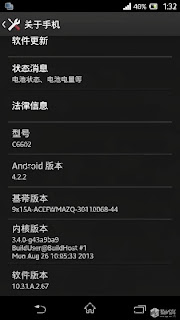
As announced by Sony Mobile, Xperia Z started today received a new Firmware update (10.3.1.A.2.67). In this update Sony promises improvements to the screen, camera, computer performance.
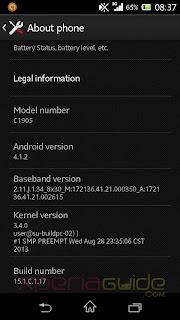
Sony Xperia M has 15.1.C.1.17 Firmware update on Android 4.1.2, the focus changes to fix errors in the boot sequence, referring to the phenomenon of green when shooting, improved management ram.
Do you check for updates through Sony PC Companion.
Sony Xperia Z, Xperia M started a new firmware update (10.3.1.A.2.67), (15.1.C.1.17)

Sony Xperia Z, Xperia M started a new firmware update (10.3.1.A.2.67), (15.1.C.1.17)
Source: XperiaGuide, XperiaBlog
Read More..