Showing posts with label a. Show all posts
How To Create A New Blog On Blogger com
Thursday, June 16, 2016
Blogger | How to create a new blog
Hello and welcome to Poproductions Online help, today we decided to help you get started on creating your own free blog on blogger.com.
But before we take you through the steps you might want to learn more about blogger?
Here is a little news about blogger:
Blogger is an online service owned by Google that publishes single or multi-user blogs created entirely by the user. The service has quickly become the preferred choice of many novice bloggers and is one of the easiest methods of creating and publishing a blog for free. If you are unfamiliar with the service, this article will teach you how to set up an account and create a blog on Blogger.com
STEP#1
Using any PC web browser, type www.blogger.com into the address field (bar) and enter to load the Blogger home page.
STEP#2
Get started by signing in to your Google account (if you have one) otherwise create a new Google (Email) Account and continue the steps.
STEP#3
After signing in, the blogger home (dashboard) appears. Click on New blog that is located on the left side bar.
STEP#4
A pop-up interface will appear with a heading Blog List > Create a new blog | Enter your intended blog tittle in the Tittle field and in the Address space just below, enter the web address of your choice (Please note that blogger will verify your address to see if it is not in use (availability check) before its approved) | Once your address is available you will be prompted, if not then keep on changing it until you get an available web address (quite disturbing but hey! Its worth it)
STEP#5
Select a new Templatefrom the options just below (you can skip this step and a default Simple template will be used but you can always do the changes easily | Contact us for a support)
STEP#6
Once your address is accepted, click on Create blog! tab at the base of the working interface.
STEP#7
Start creating blogs by creating new posts from the Posts section on the left sidebar.
Was this Article helpful? Then Rate us (by selecting one of the Reactions below).
For further enquiries, call (+233)(0)202284040
Email: poproductions@live.com
Download Our Android App to learn more: app.appsgeyser.com/Poproductions
We hope this article will prove helpful, Please use the contact us button if you want us to CREATE and MAINTAIN a PERSONAL BLOG or a COMMERCIAL BLOG for your online and local business, school, enterprise etc.
Interested? CLICKHERE.
A Few Good Reasons To Upgrade From Win7 To Win10
Thursday, June 9, 2016
By Lincoln Spector
That "Get Windows 10" icon sitting in Win7s notification area will get you a free upgrade, but you havent decided whether its worth taking the plunge.
For most Win8 users, upgrading is a virtual no-brainer; for Win7 users, however, the case is not so compelling. Here are a few enhancements that might tip the balance toward Win10.
We all know that Windows 7 is an excellent and firmly established operating system that has a familiar and fully functional Start menu. And for classic, non-touchscreen systems, Win10s new Start menu offers no real advantages over Win7s.
However, Windows 10 is far more than a revamped Start menu; it has numerous features that either dont exist in Win7 or have been significantly improved. Not all of these enhancements were introduced with Win10; some are familiar to Win8 users. But Win7 users can now get the latest Windows features for free and never have to cope with Win8s "neither fish nor fowl" interface.
That said, Im not promoting the Win10 upgrade for all Windows 7 systems. In fact, Im writing this article on a PC thats still running Win7. My initial attempt to run Win10 on my production computer turned into a disaster of incompatibilities and BSoDs, as detailed in the Aug. 27 Top Story, "Thirty-day Win10 experiment lasts only a week."
There are also Win10s controversial some say notorious privacy issues to consider. For more on that topic, see the Sept. 10 LangaList Plus column (paid content).
To be fair, my Win10-upgrade nightmare ended just nine days after the OS was first released. Of course there were going to be problems many of which have since been fixed.
Sometime in the relatively near future, I plan to purchase a new PC for work. When that happens, Ill be happy to have Windows 10 for a variety of reasons. Here are five of them.
Task View: Get a quick glance at running apps
Managing and sorting through a bunch of open windows can get annoying. Win10s Task View gives you a clean, easy-to-see view of all of your open windows including warnings and dialog boxes. The displayed boxes are smaller than the actual windows but bigger than icons or thumbnails (see Figure 1), so you can really see whats in them.............................................................................................
Click HERE to View the Picture and READ MORE
What is a Humanzee
Friday, January 30, 2015
Oliver was called the ‘Humanzee’ and came to widespread public attention in 1976. The reason was because of his humanlike behaviour, preferring to walk on hindlegs, sit cross legged on a chair, help with chores around the house, etc. Besides that his small bald head and reduced prominence of his jaws yielded a humanoid appearance. Taken to Japan, in the mid 1970s blood tests showed that Oliver had 47 chromosomes – one more than humans, one less than chimps.
In autumn 1996, Chicago University geneticist Dr David Ledbetter revealed that Oliver had 48 chromosomes and later on, DNA analysis expert Dr John from Texas’s Trinity University also concluded that Oliver had 48 too and therefore dispelling the myth of Oliver being a mutant.
This post sponsored by:Dr Mobiles Limited
1 Huron Street, Takapuna, North Shore 0622
Tel: (09) 551-5344 and Mob: (021) 264-0000
Web - Map - Google+ - Email - Posterous - Tumblr - Twitter - Blogger - Flickr - Author
Apple Pay demonstration of a payment with iPhone 6
Wednesday, January 28, 2015
Apple Pay was officially launched in the United States, Americans can pay with their iPhone 6 in several shops. Several major retailers are partners with Apple as McDonalds, Subway, Disney, Sephora, or Target. The full list is much longer.
Users flocked to test Apple Pay once iOS 8.0.1 available. In fact, the update of iOS is required to use the service Apple payment. Its very fast. When paying, the cashier has to choose Apple Pay instead of credit card. The iPhone will automatically detect and wake up near a payment with integrated NFC chip. The user must then approach his smartphone terminal and put his finger on Touch ID for the fingerprint is recognized. In the space of two or three seconds, the transaction is completed.
Apple did not release on availability internationally, if not wanting to do "as soon as possible." If you believe Visa, one of Apples supplier and major credit card partners, Apple Pay could land in 2015 in Europe. This is at least the current schedule to see how Apple will manage to negotiate.
In the United States, some retailers do not accept (for now) Apple Pay. This is the case of Wal-Mart in particular. Apple will also negotiate with merchants in Europe and in the world to launch its payment service.
| payment with iPhone 6 |
Apple did not release on availability internationally, if not wanting to do "as soon as possible." If you believe Visa, one of Apples supplier and major credit card partners, Apple Pay could land in 2015 in Europe. This is at least the current schedule to see how Apple will manage to negotiate.
In the United States, some retailers do not accept (for now) Apple Pay. This is the case of Wal-Mart in particular. Apple will also negotiate with merchants in Europe and in the world to launch its payment service.
What’s in a Tablet OS
Friday, January 16, 2015

Right now, with a slew of new tablet releases making headlines around the globe, including the Samsung Galaxy Tab and the TegaV2, as well as a number of still planned releases from netbook giants Acer and MSI, the bulk of discussion has been about how this new consumer demand will play out over the next five years or so.
And while the hardware being manufactured is increasingly powerful, allowing people to do things never before possible with mobile devices, I’m interested in what an effective tablet OS really looks like. Can a tablet be truly effective for enterprise users, or even advanced household users, if it’s just a ramped up version of an OS developed for mobile phones.
The iOS is a perfect example – a software system that, while deemed restrictive by many iPhone users, still provides a decent user experience, and yet on a tablet seems much more stifling. But, there are more than just “closed OS” issues on the tablet market right now. Recent issues have developed with the open model used by Google for their Android OS.
Since Android is available for licensing and free use for any manufacturer that meets technical requirements with their devices, the OS is appearing on a wide array of devices – including advanced devices like the Galaxy Tab and extremely budget devices like the GenTouch Latte being sold for less than $200.
But, most consumers don’t know the difference between the different versions of Android, leading to issues between Google and manufacturers when devices make it appear that users will have access to the Android Marketplace and clearly do not.
What Should an OS Offer?
So, the big question now is what an OS needs to offer to be effective for a tablet device. What does a tablet need that a smart phone does not? To start with, it should be flexible. It should allow users to type naturally, input data manually (with or without stylus) and access the same software they are used to using on their desktop.
The iOS does not do these things and right now Android is working on it. With Gingerbread recently announced and a handful of tablets on tap from Motorola and Acer this November or December, we will soon see how the 3.0 OS from Google handles more advanced applications. Of course, we must remember that this is still an OS developed first and foremost for phones and while tablets are becoming more common and are likely figuring into the equation, Google knows where the demand is at the moment.
So, what is the solution? Honestly, I don’t think anyone knows just yet. For me, having access to advanced applications through Windows is a must on a tablet, and software like Thinix can make it more intuitive on a touch screen. It remains to be seen how the new RIM operating system will handle the PlayBook or how Gingerbread will perform, but we know one thing for sure – tablets are becoming more mainstream and whether these OS developers realize it or not, their software will need to cater to more than just casual users and entertainment apps in the very near future if they want to remain successful.
Interestingly one solution that is sparking interest comes from Tegatech in the newly released TEGA v2. It is the first Tablet in the world to offer both Windows 7 and Android in one device. Its called “dual-boot” and while its not quite perfect, it provides a solution for many users. On the Windows side users have access to all their preferred Microsoft Applications, and on the Android side battery life is optimized and the touch experience enhanced through Android. Again I don’t know if this is the perfect choice but it sure opens the TEGA v2 to a breadth of usage scenarios not available prior to its release.
Instructions on how to root Xperia Z FW 10 3 1 A 0 244
Tuesday, January 6, 2015
![]() |
| Instructions on how to root Xperia Z FW (10.3.1.A.0.244) |
Yesterday Xperia Z / ZL has been unexpectedly upgraded Sony new FW 10.3.1.A.0.244 with many significant improvements in performance as well as a series of nasty bug fix in the previous FW. But rooting is what most people want to do on the FW upgrade to perform to install a mod favorite.
Read more »Xperia T V New Firmware certificate 9 1 A 1 145 TX received 9 1 G 0 3
Monday, January 5, 2015

Do not know if there is any coincidence here or the fact that Sony Mobile is a huge change in the "care" for the Xperia sample batch updates through the recent FW regularly, especially after updating information on the Xperia FW was slow to ear "boss" Hirai. The joy of the people today use Xperia TX, T and V, the Xperia end of 2012 3.
Accordingly Xperia TX received a new certification FW 9.1.G.0.3 code changes from current FW 9.1.A/BXXXX, the improvement is not clear, but what is difficult to Android 4.2.2. Xperia T / V also received a certificate with the new FW 9.1.A.1.145 is rather similar to the current version 9.1.A.1.141,
Read more »Sony Xperia L officially started a new firmware update 15 0 A 2 17
Sunday, January 4, 2015
![]() |
| Sony Xperia L officially started a new firmware update (15.0.A.2.17) |
Xperia L has just received new FW codenamed 15.0.A.2.17, in this update Android 4.1.2. Sony remains adds Small Apps and enhanced machine performance . Users can now update via PC Companion.
Read more »Sony Xperia Z Xperia M started a new firmware update 10 3 1 A 2 67 15 1 C 1 17
Wednesday, December 31, 2014
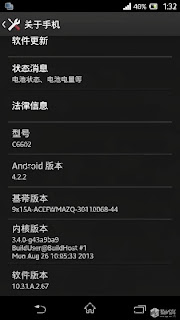
As announced by Sony Mobile, Xperia Z started today received a new Firmware update (10.3.1.A.2.67). In this update Sony promises improvements to the screen, camera, computer performance.
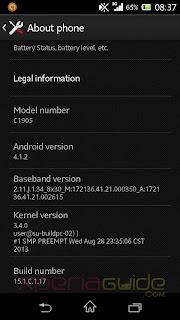
Sony Xperia M has 15.1.C.1.17 Firmware update on Android 4.1.2, the focus changes to fix errors in the boot sequence, referring to the phenomenon of green when shooting, improved management ram.Do you check for updates through Sony PC Companion.


Source: XperiaGuide, XperiaBlog
Subscribe to:
Posts (Atom)