Showing posts with label tablet. Show all posts

Apple iPhone 5 Unlock iPod iPad Google Android Tablet Repair new advertisement design April 13 2013

Saturday, January 31, 2015


Some of our new advertisement design for year 2013
This post is sponsored by:

Dr Mobiles Limited (Map)
1, Huron Street, Takapuna, Auckland 0622
Tel: (09) 551-5344, Mob: (021) 264-0000
info(a)drmobiles.co.nz
Facebook - Blogger - Twitter - Tumblr - Google+
 
New Lynn Branch (Map):
3069, Great North Road, New Lynn, 0622
Tel: (09) 5555-344, Mob: (021) 374-007sales(a)drmobiles.co.nz
Read More..

Talkn Tablet Downunder Show 4

Wednesday, January 21, 2015

Podcast: Talk’n Tablet Downunder #4

Dowbload: Listen into this podcast
(21.3MB, 30:35 minutes)

Artists: Hugo Ortega, Nick Randolph (Mobile MVP, Visual Developer - Device Application Development)

Episode#: 4
Episode Name: Nick Randolph on UMPC and more
Show Notes: This was my 4th audio podcast after several months off. Admittedly it is always harder than the "real podcasters" make it seem, and this occasion is no different. My goal was to capture a moment with Author and Microsoft MVP, Nick Randolph, and record his thoughts on the new Ultra Mobile PC form-factor. Given that Tech.Ed Australia 2006 had just concluded and the fact that Id loaned Nick the Samsung Q1 to play with, NOW seemed as good a time as any.
Whats in the cast?
  • What did you like/dislike about UMPC?
  • Data input on Mobile Devices
  • Dr. Neils session at Tech.Ed Australia 2006
  • UMPC and its Sex Appeal
  • Craig Pringle and Nick Randolph unite to write
  • Web based apps vs. Rich User experiences
  • Windows CE and the .NET Compact Framework
  • Nicks Tablet Experience (HP TC1100 - discontinued)
  • OneNote 2007 Beta - search capabilities
  • UMPC and the future
  • UMPC in the Aussie Outback
  • Professional Visual Studio 2005 (Nicks first book with Andrew Parsons)
  • TechEd 2006 Mobile Wipeout: Roger Lawrence, Rick Anderson and Hugo Ortega
  • Tech.Ed Australia 2006 Keynote/Locknote with Frank Arrigo and the future of Windows
  • UMPC and Multi-touch
  • NZ Shoutout: Craig Pringle (Tablet MVP), Mauricio Freitas (NZs Top Tech Website, GeekZone), Chris Auld (Regional Director)
  • Perth Mobility User Group (Watch out in January 2007) - Doug Paice
References:
  • Forum for Nick Randolph and Andrew Parsons new book - here


Talkn Tablet Downunder: Show #1, Show #2, Show #3

Read More..

7 Flytab V3 AllWinner A13 A7 Tablet PC

Flytab-V3 Allwinner Tablet PC


Specification : 7" Series S7-A10 Tablet PC
Processor / Cortex
Allwinner A13 base Cortex A8
Frequency / Ghz
1.2Ghz Max upto 1.5Ghz
Ram / Random Memory
RAM 512-DDR3
Flash Memory / Nand Flash
4GB  
Speaker Sound
unknown yet
Microphone / Mic
Internal Built
Reset / Reset Method
No / press power until it off 
Button
-

Right Side
Power / Volume + / - Button
Display
Resolution
800* X 600* High Definition TFT
Size
7" inch
Touch screen
5 Point Capacitive Flat Glass Design 
Camera / MP
1.3 Mega pixel
3G / Broadband
Dongle Huawei / ZTE (many model)
Video Format
Support upto Super HD 2160P Resolution
G-Sensor
4 way Gravity-sensor / Accelerator
Network
WiFi
IEEE 802.11b/g
IN/OUT
Audio Equipment
3.5mm Headset in
USB
1*MINI USB / 1*HDMI / 1*TF-Card
DC-IN
5V 2000ma
Storage deck
Max upto 32GB
System
Operating System
Android 4.0 ICS
Power
Battery
3200mAh/7.4V (4-5 hour Play time)
Adapter
DC 5V 2.0A
Accessories
Mini Usb cable x1, Powe charger x1, Manual book  
Tablet pc Size
203*125*14mm 0.4kg
Full Packaged Size
230*167*80mm 0.8kg


Selling Point :
  • Metal casing design - more solid feel & appearance & Light weight
  • More quality have been improve (Most stable product we ever sell!!!)
  • Price still affordable , best value for money 
  • Save you of out most problem

Non function :

  • No GPS
  • No Call / SMS
  • No Insert SIM
  • No Bluetooth

Price Announced : RM 280.00 Nett (online price)
                             RM 359.00 Nett (shop price)


Let see more How well of this tablet


more video might upload

now let see more picture


PRICE : RM 280.00 


Flytab-V3 Tablet PC x 1 Unit
USB-PC cable x 1 Pcs 
USB-OTG x 1 Pcs
Headphone x 1 Pcs
Charger x 1 Pcs

 Casing poly : RM 18.00


Leather Keyboard : RM 45.00


ONLINE CUSTOMER
TAKE CAUTION NOW DAY PRICE

RM 210.00 - TABLET PC X 1PC
(FLYTAB - V3)-NO WARRANTY
(NO CABLE /CHARGER/ACC)

RM 240.00 - TABLET PC X 1PC
- PC USB CABLE X 1PC
- OTG-USB CABLE X 1PC
- CHARGER X 1PC
- HEADPHONE X 1PC
MANUAL BOOK X 1PC
-(NO WARRANTY)


RM 240.00 - TABLET PC X 1PC
- PC USB CABLE X 1PC
- OTG-USB CABLE X 1PC
- CHARGER X 1PC
- HEADPHONE X 1PC
-MANUAL BOOK X 1PC
(6 MONTH LOCAL WARRANTY)


PRICE IS NETT FOR ONLINE PRICE
NON NEGOTIATE AT-LEASE MORE THEN 2-3UNIT !!!

NO WASTE TIME CALL , READ WELL THEN ASK OR SMS TO QUESTION US
0162619931

THANK YOU FOR CO-OPERATION


Read More..

IT forensics Tablet UMPC and my cafe meetings

Tuesday, January 20, 2015

This week I must have had over half a dozen cafe meetings regarding Tablet PC, and Ultra Mobile PC. Because I’ve been handed the reigns to the Tablet PC Cart downunder I find myself in all manner of conversations. Yesterday, Saturday, I sat with an IT Forensics’ Expert that gets called in to retrieve data from Crime Related PCs. THIS WAS a FUN TALK.

Imagine being flown across the country, as an IT guru, whose job it is to reach into the embers of a petroleum-inspired fire, pull out the remains of what once was a laptop, and start to recover data. He recalls that on one such occasion the spinning platters normally found within a standard PATA/SATA hard drive had to be removed and "almost surgically" re-installed into a new encasement in order to begin the data recovery process. Often these criminals are so desperate to TRASH their PC (and the evidence therein) that they dunk them in sinks full of water and with the power packs plugged-in they turn the electricity on; he also mentioned an occasion where one crim took a sledge hammer to his device and repeatedly beat at while police were breaking down his door.

It made me recall an instance where I performed some Tablet PC surgery myself. I know that firstly there needs to be a love for PC intestines when doing this sort of work. It isnt for the faint hearted and should not be attempted at home. If I were the ‘crim’ Id resort to running (literally) two Tablet PC’s with a copy of Microsoft OneNote 2007 BETA installed on each. This way I could synchronize my handwritten notes over a second PC and burn one laptop while making away with another under the arm!!! LOL

Another meeting I had this week was with a Window Manufacturer. He tells me that the Window Manufacture industry is one of the largest in the world and most lucrative too. The contracts on big high-rise buildings are obviously an example of really good "danger money." This particular guy had an awesome application designed to ‘measure and quote’ a Window job [using Microsoft Windows...sorry couldnt help the punt].

We sat there and enjoyed coffee while he installed hes application on several Tablet PCs, took photos and familiarized himself with several Tablet related products on the market. The one question that keeps rearing its head seems to be that of "active digitizer" vs. "touchscreen" pcs. Talking my way through the XY coordinates of a touch, vs. the XYZ coordinates of the Active Digitizer; it becomes clear that in almost every case the merits of the active digitizer far outweigh that of the touchscreen.

As a project the Microsoft Origami Project was designed firstly to bring down the cost of regular (active digitizer) Tablet PCs. It was apparent early on in the project that the highest consumption of the manufacture dollar was the active digitizer board itself; hence, UMPC was released sporting touchscreens. What weve now created is a new market appeal where the price point has reached a happy medium for Tablet PC (via UMPC) but we are now looking at reversing the excitement due to poor User Experiences with the touch. What Im looking forward to is the day where Wacom, or equivalent, decide to release boards with pricing equivalent to that of the touch; hopefully then we can integrate Touchscreen Tablets with an Active Digitizer too.

Right now we can lock off a touch screen’s "touch ability" via a simple locking mechanism. If therefore that same Tablet had an embedded Wacom style active digitizer board then a user could pick up a pen and enjoy the XYZ coordinate appreciated by so many Active Digitizer users. The only dilemma that remains now is to solve the price issue, and not [contrary to popular thoughts] the manufacture process of such a device. We can manufacture such a device but who would buy it??? Youre already complaining Tablets are too expensive!

This week I helped a fellow blogger with the purchase of a Tablet PC, the Fujitsu LifeBook T4210. I had the pleasure of reviewing its predecessor, the Fujitsu LifeBook T4020, but the T4210 sports several new features like multi-directional screen rotation, water resistant keyboard, on-screen biometrics...and a new silver/charcoal colour too. The blogger Mitch Denny even posted about the arrival of the beast! Best to you Mitch.

One unique part of my week was attending a meeting regarding the opening of a new cafe in Sydney. Not only did I floor the group when I started annotating on my Slate but I managed to hand it around too. I had to consult on several IT related matters but most amusing was my talk about the "Power of Blogging for Business." Those of you that run blogs should spend a portion of your week evangelizing Blogging, not just the topic you ACTUALLY blog about. Ive been tuning into Cameron Riley lately, and, as some of us do, he has been making ends meet by consulting. Hes preferred topic is MediaCasting and the power of manipulating the media, i.e. almost becoming the media, around you. Well done Cam! Another legend who spends time evangelizing blogging itself is Frank Arrigo.

Next week I’m at Tech.Ed Australia 2006 helping out (as a volunteer) on Microsoft’s Mobility Stand. Pop in if you get a chance.

I loved my week, it was great.
Read More..

Tablet PC Southern Hemisphere Style

Monday, January 19, 2015

I want to share three stories from my week in an episode dubbed: Tablet PC – Southern Hemisphere Style.

Because Tablet PC and Ultra Mobile PC are still considered very “vertical market” in the Southern Hemisphere sometimes these devices end up in rather ubiquitous locations, and circumstances. I want to share two such circumstances that I thought were worth a mention; and my third story is a warning to Fujitsu P1610 buyers.

Let’s begin in Hobart, Tasmania (see: lonely planet).

For those of you that don’t know where Hobart is, don’t worry neither do we! Hobart, located in Tasmania (or Tassie as we know it) is the southern most point of Australia, and actually not attached at all. You can fly there, even catch a ferry there, but you definitely can’t swim there.

This story unraveled itself about 6 days ago when I was sitting to eat some Thai food at my favourite take out called WokBar, in Dee Why. My mobile (cell) phone rang and there was a rather sweet sounding mum on the other side. Her name, Maree, and husband’s name, Rob, came across as a mum-and-dad team should, i.e. caring and happy-go-lucky. Our conversation carried on for about 15 minutes and revolved around their little 3yr old boy Rohan (pictured with favourite toy, "blue").

It turns out that Maree and Rob had been hunting for advice regarding Tablet PC for quite some time. Their needs are rather unique in that Rohan suffers from Cerebral Palsy – a debilitating permanent brain injury that affects an infant in the womb; it can prevent or inhibit walking and cause a lack of muscle coordination, spasms, and speech difficulty.

As a dad of one (Leon my five year old) and soon to be father of a Daughter (Amber due in late November) I couldn’t help but connect with Maree and Rob’s plight. During the conversation my feedback focused on the resistive qualities of several touch screens, and the significant difference a large display could make to someone with poor motor skills. Subsequently - due mostly to a light weighted touch, a slate design and 12.1” touch screen - Maree and I settled on the Sahara i215 tablet by TabletKiosk.

Maree imparted much of her story and inadvertently let me into her inner-circle of loved ones. Rohan was 3 in August and his grandmother Marie tells me that Rohan is an adorable child with lots to offer. “His body suit helps his body-control, and his walker gives him freedom,” his grandmother told me. “This computer will help so much!” She also shared with me that Rob (the father) is a fulltime carer that looks after Rohan and his sister Emily very well. The irony is that mum Maree is also a sonographer and actually performed her own Ultrasound before birth; the unavoidable circumstance that followed left Rohan with his disorder, and mum and dad with a forever changed life.

Although the role I played was minute, and perhaps inconsequential, we did manage to get Roahan the Tablet for under replacement value. I do like to think that I helped the little guy and I’m looking forward to hearing of his progress; I am promised updates and photos regarding his interaction so I can’t wait to share more with you.

The second story, from an even more remote location, comes out of the Solomon Islands; and it involves UMPC! Today I received this email from a friend of mine named Glenn Vassallo of Bold Intelligence:

“I wanted to let you know how things are progressing with the EO UMPCs. They have been used for about a month now at Honiara International Airport where it is very hot and very humid, so far they have worked without a hitch. The UMPC was a perfect solution as the size makes them very portable, while still offering enough screen real estate to run the browser based survey software. The solution uses the UMPCs wireless to connect to a Windows 2003 Server located at Solomon Island Telekom co-hosting facility. I’ve attached a few photos of me testing the unit at Honiara airport. "

How cool is that? Did you even know that the Solomon Islands existed, and that the capital city is called Honiara? When I heard that Ultra Mobile PC, the Otto Berkes brain child, has made it to the remotest of remote locations in the world, and is actually experiencing success, I couldn’t help but feel contented. For those of you that have no idea where or what the Solomon Islands are then wonder over to the U.S Department of State website or the Solomon Islands website to learn more.

My last little blurb is a warning to P1610 buyers.

Today a friend of mine, a reluctant blogger named Grant, had his $1,000 dollar RAM shipped to him. What am I talking about you might ask? I’m talking about the current Fujitsu P1510, and its subsequent successor the P1610, which both run a miniaturised RAM called micro-DIMM. Not interesting you might say. But what if I told you that a 1Gig stick costs $1,999 Australian dollars (approx. $1,400 USD) - now I got your attention.

It seems the big threat to any buyer looking at purchasing a P1510 or P1610 is not so much wether the device "hits the spot”, because I think we all agree it rocks, but rather the RAM upgrade. At over a third the cost of a replacement device the RAM itself could prove to be a hindrance rather than a “must have” accessory. Because I saw GottaBeMobile run a story today and JK last week regarding the P1610 I thought I would take time to place a little reality check on the hype. [although I’ll still be buying one!]

BTW, those of you that followed my post regarding the P1610 (world exclusive), please be patient as the video will be back.

So that was me, Hugo Ortega, in action this last week. It’s been fun, emotional and frustrating. But best of all its been Tablet!

Have a great week!
Read More..

Cant help but talk Tablet

Saturday, January 17, 2015

As you all know I was involved with the CeBIT Fair just recently. I was helping out one of the stands, as Tablet PC Guy, and also running the CeBIT Blog. Although I could not be too opportunistic, what I could do is be efficient.Allow me to explain.

I love Tablet, & Tablet loves me; As I made my way through The Official Blog duties I managed to squeeze in some valueable Tablet exposure.

Heres some examples:

  • http://cebitaustralia.blogspot.com/2006/05/vice-president-meets-hugo-cebit.html(during the interview)
  • Origami unfolds at CeBIT, again!
  • Da Vinci touches Wacom at CeBIT(Hey! Its still Tablet exposure)

The greatest moment however was when Australias Gadget Guy, Peter Blasina, from the Sunrise Show, invited me on stage to talk about the Ultra Mobile PC. Since I was at CeBIT helping out one of the UMPC resellers I decided to take up two other poducts too; a Home Automation device by Superna Systems, and the worlds thinnest credit card sized flash memory, Walletex.

Enjoy this video here, or here, or here:


Read More..

What’s in a Tablet OS

Friday, January 16, 2015

Right now, with a slew of new tablet releases making headlines around the globe, including the Samsung Galaxy Tab and the TegaV2, as well as a number of still planned releases from netbook giants Acer and MSI, the bulk of discussion has been about how this new consumer demand will play out over the next five years or so.

And while the hardware being manufactured is increasingly powerful, allowing people to do things never before possible with mobile devices, I’m interested in what an effective tablet OS really looks like. Can a tablet be truly effective for enterprise users, or even advanced household users, if it’s just a ramped up version of an OS developed for mobile phones.

The iOS is a perfect example – a software system that, while deemed restrictive by many iPhone users, still provides a decent user experience, and yet on a tablet seems much more stifling. But, there are more than just “closed OS” issues on the tablet market right now. Recent issues have developed with the open model used by Google for their Android OS.

Since Android is available for licensing and free use for any manufacturer that meets technical requirements with their devices, the OS is appearing on a wide array of devices – including advanced devices like the Galaxy Tab and extremely budget devices like the GenTouch Latte being sold for less than $200.

But, most consumers don’t know the difference between the different versions of Android, leading to issues between Google and manufacturers when devices make it appear that users will have access to the Android Marketplace and clearly do not.

What Should an OS Offer?

So, the big question now is what an OS needs to offer to be effective for a tablet device. What does a tablet need that a smart phone does not? To start with, it should be flexible. It should allow users to type naturally, input data manually (with or without stylus) and access the same software they are used to using on their desktop.

The iOS does not do these things and right now Android is working on it. With Gingerbread recently announced and a handful of tablets on tap from Motorola and Acer this November or December, we will soon see how the 3.0 OS from Google handles more advanced applications. Of course, we must remember that this is still an OS developed first and foremost for phones and while tablets are becoming more common and are likely figuring into the equation, Google knows where the demand is at the moment.

So, what is the solution? Honestly, I don’t think anyone knows just yet. For me, having access to advanced applications through Windows is a must on a tablet, and software like Thinix can make it more intuitive on a touch screen. It remains to be seen how the new RIM operating system will handle the PlayBook or how Gingerbread will perform, but we know one thing for sure – tablets are becoming more mainstream and whether these OS developers realize it or not, their software will need to cater to more than just casual users and entertainment apps in the very near future if they want to remain successful. 

Interestingly one solution that is sparking interest comes from Tegatech in the newly released TEGA v2. It is the first Tablet in the world to offer both Windows 7 and Android in one device. Its called “dual-boot” and while its not quite perfect, it provides a solution for many users. On the Windows side users have access to all their preferred Microsoft Applications, and on the Android side battery life is optimized and the touch experience enhanced through Android. Again I don’t know if this is the perfect choice but it sure opens the TEGA v2 to a breadth of usage scenarios not available prior to its release. 
Read More..

Lenovo shows OEMs how to talk Tablet

Recently I posted about opening discussions with Lenovo, with an intention to help expand their Tablet PC branding here in Australia and assist their own team of resellers in better comprehending the power that is “ink.” I’ve since exposed their X41 to congregations of Tablet enthusiasts and oodles of Tablet newcomers.

While their X41 is fairly conservative (read: old-school) in the looks department, it is a surefire winner when in the hands of a Tablet PC virgin. Even though its looks lack any of the “Shock and Awe” tactics displayed during the recent Iraq conflict, they do facilitate a Tablet first-timer in easily accepting Tablet PC as a conventional form factor; I strongly believe the Motion and Sahara Slates are sex on PCB but also admit that sometimes they seem to intimidate, rather than impress.

Upon approaching Lenovo one quality that was evident from an early stage was their eagerness to target the end-user. They greeted my proposal with the usual OEM apprehensiveness, but managed to move on quickly and issue me with an X41 to play with - thanks mostly to Lenovo BDM, Greg Hunt . I would like to note that it’s not only a show of support witnissed by “Australia’s Tablet Guy” (me) but one also witnessed by Australian Podcast Royalty, Cameron Riley – admitting in a recent podcast we recorded together on "The Productivity Show" that he too has been issued an X41 to trial. (Don’t call your nearest Lenovo representative just yet, remember Cameron and I have lots of leverage)


Tonight while checking in on my mate Rob Bushway, via his GottaBeMobile.com Blog, I saw him pointing to this Lenovo Television Commercial (that hed ripped on his MCE PC). For those of you living in the United States you may wonder if it was really worth blogging about. What you may not realize however is that life does exist outside of your country; for those of us living in any other country outside of the United States we know only too well that life outside of the United States of America is nothing but “delay-time.” We’ll frequently receive product, information, news and reviews only too often after the fact. One example of the effect this has on non-American’s is the way we watch television, and moreover advertising. Even with all my energies tied up in Tablet PC I have yet to see a Television commercial in Australia that purely marketed Tablet PC; so when Rob posted this commercial, screened during the series of 24 on Fox, I just couldn’t help but link to it!

Enjoy Aussies and Kiwis!!!

Good job Rob, the effort is appreciated Downunder!
Read More..

Hugo Ortega reviews Fujitsu T4020 Tablet PC

Wednesday, January 14, 2015

Last night I set myself the fortunate task of reviewing the Fujitsu T4020 Convertible Tablet PC. Although the task is somewhat becoming more familiar to me, on this occasion it was combination of some nerves and lack of sleep that turned a simple task, into a two day affair.

Fujitsu sent me the T4020 to use as my preferred blogging device during my role as CeBIT Blogger; I’ve been the proud holder of the device since May 10th and have found it to be quite an asset. While this is my first formal video review of a Tablet PC I think the results may provide you with an insight into the T4020’s look, feel and performance; one day I’ll put together a ‘bloopers’ reel of this review, it’s so funny.


Sit back and enjoy as Hugo Ortega reviews the Fujitsu T4020 Tablet PC…after this effort he has a new found respect for other famed video bloggers like Rob Bushway and James Kendrick, you guys rock!

Watch it here, or here:
[9 min/33MB]

Read More..

Tablet PC Surgery Scalpel Please!

Tuesday, January 13, 2015

Tablet Surgery requires extreme patience and concentration. Sometimes the most arduous task like resetting BIOS (in this case unplugging the battery for 3 seconds) can turn into a 45 minute marathon.

In UberTablet.blogspot.com we’ve promised to BLOG our Tablet PC experiences (Sydney, Australia). This experience is a visual feast for all you Hardware geeks, and Tablet PC enthusiasts to remember and share.

20:45 1st Feb 2006

Uber Nurse: Doctor, Doctor, we’ve lost the pulse…what do we do?

Uber Doctor: Give me a summation of the situation please nurse?

Uber Nurse: The victim (Tablet PC) came in at approximately 20:45. We initiated DC into the device and tried reboot – no avail! We’ve removed the battery pack and inserted 60GB of 5400rpm H.D.D and again no elation!! Currently we’ve not witnessed signs of life for approximately 90seconds. Family members, upon questioning, recall no odd behaviour prior to the event. “We’d placed a Gig of RAM in the device about a week ago”, one distraught family member recollects, “the next time I went to utilize the device I couldn’t wake her up”, he lamented just before bursting into tears.

Uber Doctor: Nurse, knowing that Microsoft Knowledge Base chronicle’s Hibernation issues with Tablet PC Edition 2005 ( http://support.microsoft.com/kb/893056) I recommend a BIOS reset and immediate FLASH after reboot.

Uber Nurse: But Doctor…

Uber Doctor: Nurse! Please! I’m familiar with the procedure; now hand me the 9mm philips screwdriver and initiate pouring of 350ml of Soda Water…for me please.


The following is a graphical record of BIOS resetting on the Sahara Slate PC. While the procedure may seem daunting, I will use all resources at my disposal to journal the event, for your future reference and mine.

Do not try this at home folks. I’m highly skilled, experienced, and have the replacement parts at hand in case things get ugly. Its important for you to know that this issue (as per Microsoft KB 893056) is now virtually non existant with Tablet PC. The key here is to have the latest Manufacturer BIOS installed on your Tablet at all times.

Lets begin:

Take 1x non-booting iTablet Slate PC (Sahara) and my trusty 100-in-1 Screwdriver set;
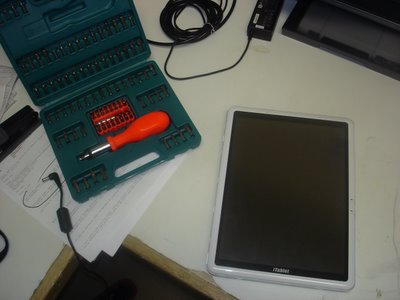
Now dismantle;
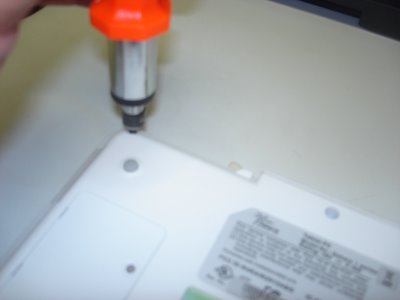
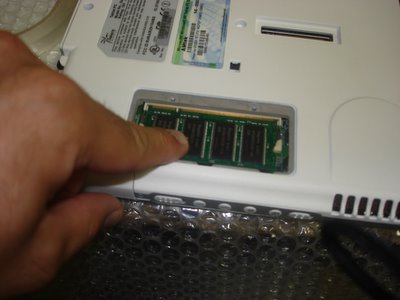
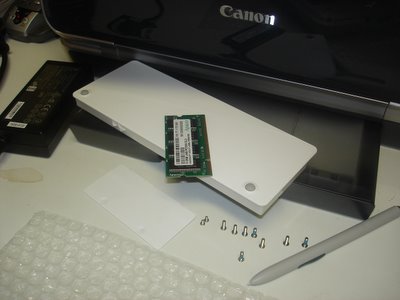
Take the RAM cover plate off and lift the memory module out (PC2700 184pin SDRAM), remove the Battery Pack, 8 medium sized screws, 2 small screws, and the Wacom Digitizer pen out of its sleeve - the bubble wrap is there to protect the Tablet from incidental scratches from my workbench;
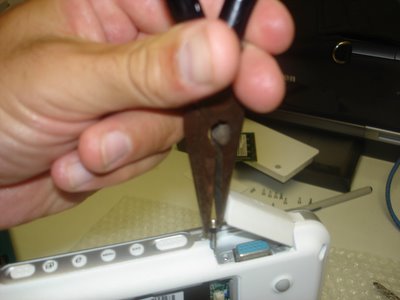
Unscrew the VGA connectors.
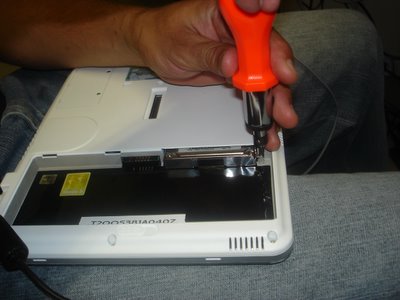
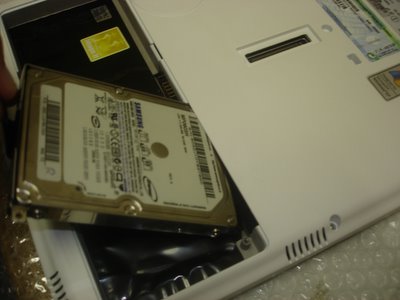
Now unscrew 1x small screw and you can pry out the 2.5" hard drive.
Almost forget, pop out CF slot protector from the CF slot.
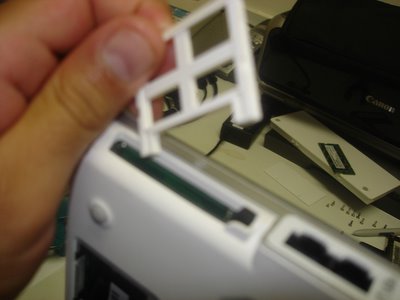
Now stick your fingers in and CRACK, the case will begin to show some PCB. Can you smell it? mmmmm...
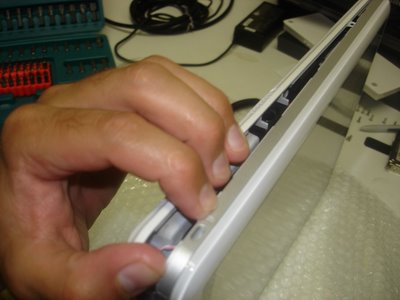
Thats right, go where the sun dont shine!
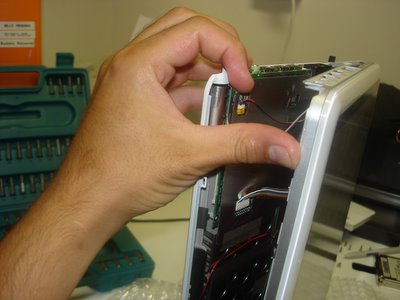
Now this is where your average Power User becomes Power-less, but not you, your an Uber Tablet Geek. Do you see the little ribbon cables, thats where your hands are gonna surgically disconnect the screen from the motherboard.

Come on, get in there!
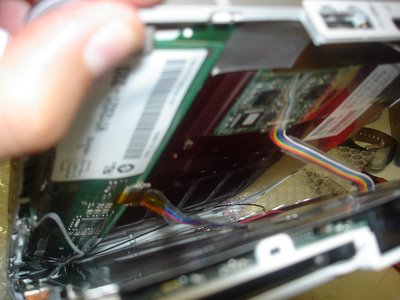
Well done Uber Geek! Youve carefully peeled away both halves to unveil the most glorious look at your Wacom Digitizer board sitting on top of the Tablet PC screen (LEFT pic.), while the alloy shielded motherboard anxiously awaits its undressing.
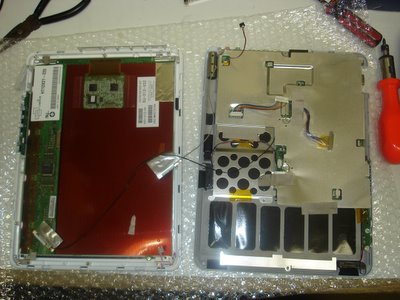
Dont let the beast intimidate you. Grab him, tame him, and unscrew the alloy shield and lets get to the motherboard!
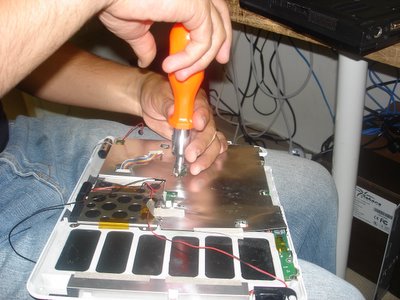
Now that were at the guts of the machine, remove any of the remaining intestines (cables and connectors) from the motherboard.

You probably dont need to disconnect all the cables, but I just love pulling things apart.
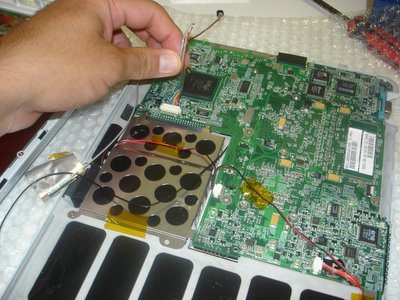
Release the motherboard from its human constraints (the case) and get ready to hit the PCB-spot.
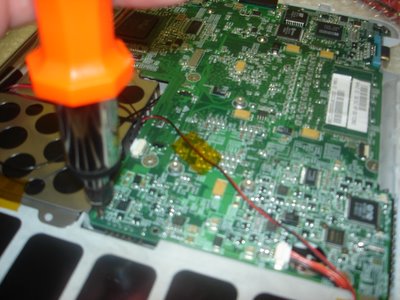
Now peel the case away from the motherboard, ensuring that youre not forcing them from each other.
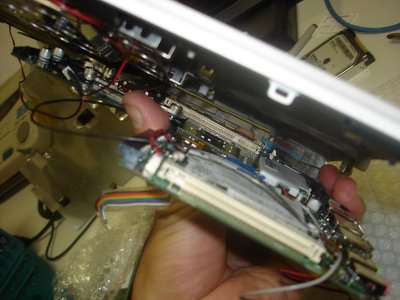
There she is, the under belly, a site that will either make your stomach turn or your heart race with excitement; either way it’s the device that has revolutionized the way a lot of us live.

Oh! Theres the battery (in blue) that weve so eagerly gone hunting for. We’re now on the home stretch.
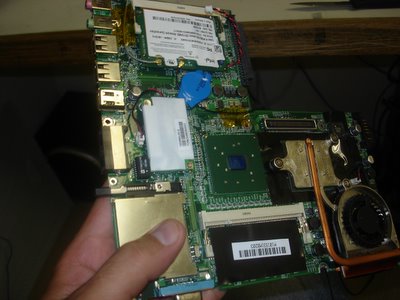
Now grab the 2-pin cconnector and seperate it from the motherboard for 3 seconds. Youre done! Well done!
The BIOS is reset; now put it all back together you clown!
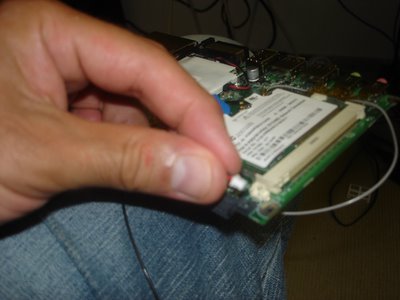
One last peek,
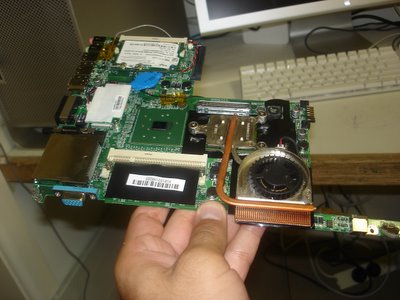
and back she goes. This unceremonious disrobing will soon be complete and the Tablet PC will live to INK another day.
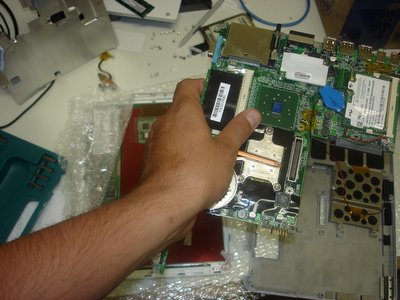
Turn the motherboard back over and secure it into place. Careful now, we dont want any screws left over!
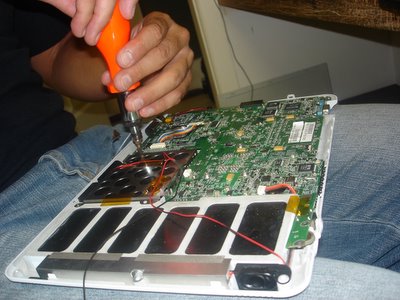
Alloy sheath back on, ribbon cables connected, and your almost ready to reunite both halves.
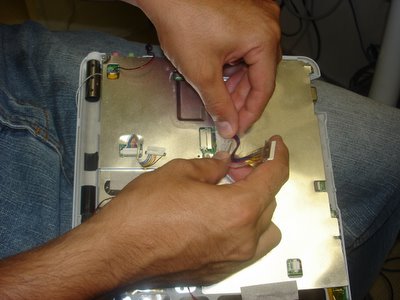
Youll require some finger gymnastics to really make this work so make sure you do your stretches.
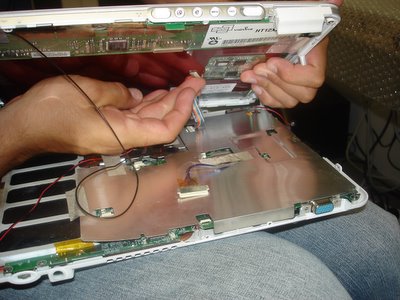
Dont forget to complete all the connections;
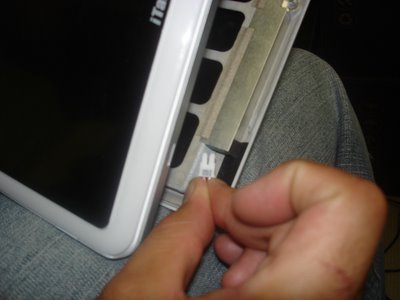
and I mean all of them.
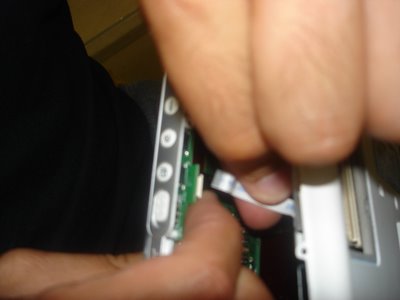
Wedge to two halves together, and fasten the screws again.
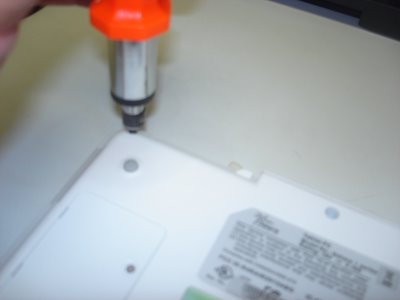
Put the RAM back,

Hard Disk back,

Battery Pack back,
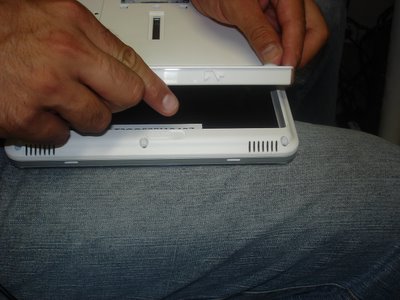

and youre all done Uber Geek.
Now watch the video and see if it works:

See if she boots - click here!!


  • Need any more information?
  • Had any PCB wars of your own?
Read More..